
What it does
SimulationCraft is a program that simulates your character's damage on your computer. For that it needs a profile with your gear, talents and professions. This addon generates that profile from inside the game.
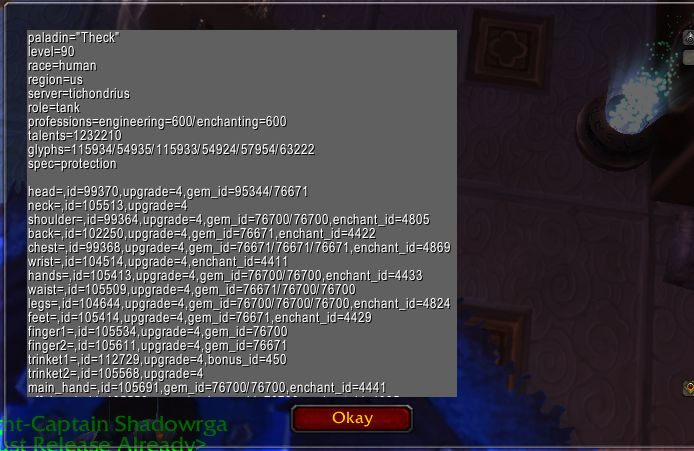
Type /simc and your profile opens in a text box, already highlighted and ready to copy. Paste it into SimC's Simulate window or save it as a .simc file. You do not need to log out and back in to refresh the Armory.
It also works when the Armory is unavailable, such as with beta or PTR characters. Since version 1.2.0 it is locale-invariant: items, glyphs and talents use numerical formats, while professions, specialization and class use English-client values.
Key features
- Generates a character profile on demand; no relogging to refresh the Armory.
- Works when the Armory is unavailable (beta and PTR characters, for example).
- Locale-invariant output: items, glyphs and talents are numerical; professions, spec and class use English values.
- A text box that is ready to copy.
Requirements
- To use the profile you need the SimulationCraft application (simulationcraft.org). The addon only generates the profile.
Installation
- Download the zip and extract it.
- Move the
Simulationcraftfolder inside it intoWorld of Warcraft\_forever_\Interface\AddOns\. - Close the game completely and reopen it (
/reloadalone does not load new files). - On the character select screen, check that the addon is ticked in the AddOns list.
Commands
/simc- Opens the exported profile in a text box, ready to copy.
/simc minimap- Toggles the minimap button.
Notes
- Bugs and inaccuracies are reported through CurseForge's ticket system.
- The source code is on GitHub (simc-addon).
FAQ
Where do I paste the generated profile?
Into the SimulationCraft application's Simulate window, or save it as a .simc file.
Does this addon run the simulation itself?
No. The addon only generates your character's profile; the SimulationCraft application runs the simulation.
Author and license
Simulationcraft is written by Theck, navv_, seriallos. License: GPLv3.