
What it does
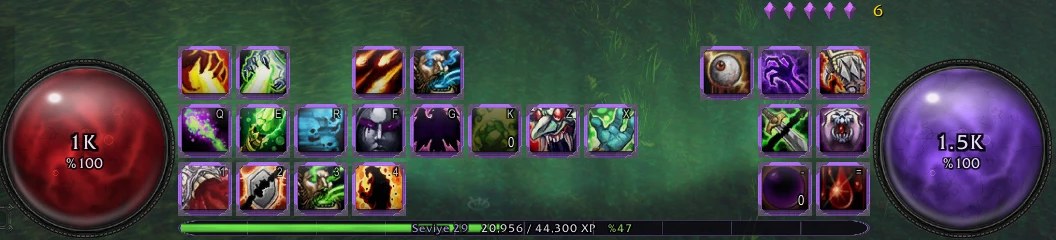
Square 3D action bars: three rows in the middle of the screen, two columns on the right. They are Blizzard's own buttons, so key bindings and page switching work as usual.
Cooldown numbers on every button; a blue edge without mana, a red edge out of range, and a short heartbeat when a cooldown ends.
Health and mana in Diablo-style orbs with liquid, bubbles and a surface wave. An XP bar below and an aurora in your class colour behind.
Pick the button frame: Iron corners, Stone slot, Silver filigree or no frame. An optional dark ring goes around the orbs. Bar size, orb size and visibility out of combat and in combat are set in the options window.
Key features
- Square 3D action bars on Blizzard's buttons: key bindings and page switching keep working.
- Cooldown numbers, mana and range edges, a heartbeat when a cooldown ends.
- Diablo-style health and mana orbs, an XP bar, an aurora in your class colour.
- Four button frames and an optional orb ring.
- Bar size, orb size and visibility:
/dui options.
Installation
- Download the zip and extract it.
- Move the
ForeverDiabloUIfolder inside it intoWorld of Warcraft\_forever_\Interface\AddOns\. - Close the game completely and reopen it (
/reloadalone does not load new files). - On the character select screen, check that the addon is ticked in the AddOns list.
Commands
/dui options- Settings window.
/dui frame- Change the button frame.
/dui ring- Orb ring on or off.
/dui scale 1.2- Bar size (0.6 to 1.6).
/dui orbs 1.1- Orb size (0.5 to 1.5).
/dui alpha 0.8- Visibility out of combat.
/dui fight 1- Visibility in combat.
/dui move- Move the bars (lock or unlock).
/dui keys- Key bindings.
/dui pages- Page lock (Shift+2-6 and Shift+wheel).
Notes
- The file on this page is the English package (folder
ForeverDiabloUI). For Turkish, get Forever Diablo Arayüz from the Turkish page; do not install both, only one runs. - The cast bar and DoT alert are not part of this addon; install FelCast for those.
- Size changes are not applied in combat; they apply when combat ends.
- Free. Sharing it unchanged is fine; publishing a modified version needs permission from Dev/Soy (LICENSE.txt in the zip). Third-party art is CC0 (itsmars, StumpyStrust).
- World of Warcraft and Diablo are trademarks of Blizzard Entertainment. This addon is not made or endorsed by Blizzard.
FAQ
Will my key bindings and bar pages break?
No. The buttons are Blizzard's own action buttons; the addon only changes how they look and where they sit.
Can I use it with FelCast?
Yes. Forever Diablo UI is the bars and orbs, FelCast is the cast bar and alerts; they are separate addons built to run together.
Author and license
Forever Diablo UI is Dev/Soy's own addon. License: Free to use.
Comments and questions
Loading comments…
Checking your session…
