
What it does
DialogKey clicks certain buttons for you when you press a key. The default key is spacebar and you can add a second one. It is not a normal keybind: if none of those buttons are on screen, spacebar still makes you jump.
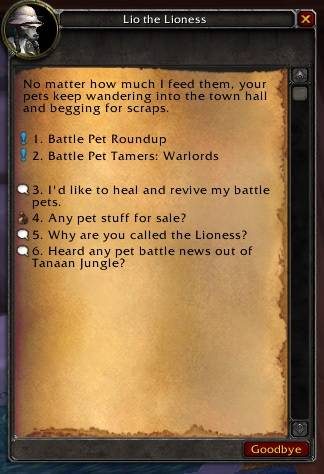
Talking to an NPC, it picks the first option, then accepts, continues and completes quests. It also presses the OK button on popups such as the bind on pickup warning, setting your hearthstone or a group invite. NPC options get numbers in front of them, so pressing 1 picks the first topic or quest and 2 picks the second.
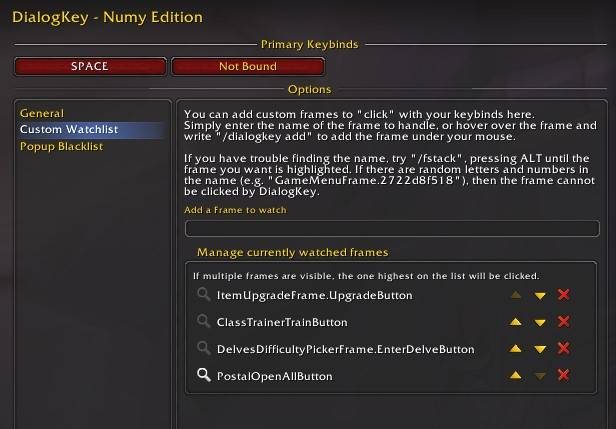
You can add buttons that are not on its list by hovering one and typing a command. If you level by questing, it cuts down a lot of mouse work.
Key features
- Spacebar selects the first NPC option; a second key can be added.
- Presses the accept, continue and complete quest buttons for you.
- Confirms popups such as bind warnings, hearthstone changes and group invites.
- Numbers NPC options so a number key selects them.
- Add or remove any button by hovering it or typing its name.
Installation
- Download the zip and extract it.
- Move the
DialogKey_Numyfolder inside it intoWorld of Warcraft\_forever_\Interface\AddOns\. - Close the game completely and reopen it (
/reloadalone does not load new files). - On the character select screen, check that the addon is ticked in the AddOns list.
Commands
/dialogkey- Opens the options;
/dkeyand/dkdo the same. /dialogkey add- Tracks the button under the cursor; you can also give a button name, which is case sensitive.
/dialogkey remove- Stops tracking the button under the cursor.
Notes
- Because of Blizzard restrictions it does not work in combat; it works again once you leave combat.
- It is not compatible with other versions of DialogKey, so do not enable both.
- Crafting orders, Delve powers and similar options in the description come from later game versions. On WoW Forever expect the dialog, quest and popup parts.
FAQ
Will spacebar stop making me jump?
No. The key only clicks when one of the tracked buttons is visible; otherwise it does its usual job.
Why does it stop working in combat?
Blizzard blocks this kind of action during combat. It works again after combat ends.
Author and license
DialogKey Numy Edition is written by Numy. License: GPLv3.
Comments and questions
Loading comments…
Checking your session…