
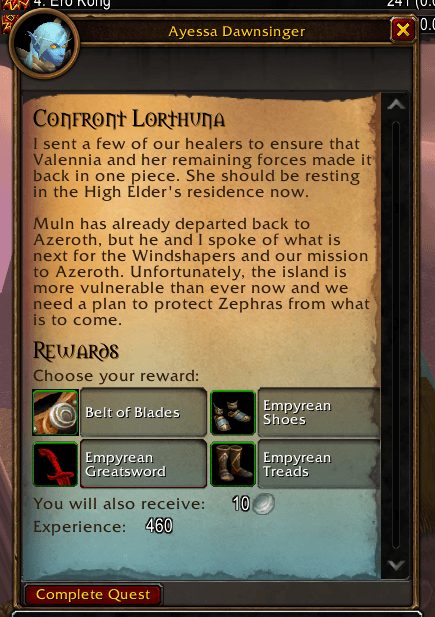
What it does
Forever Quest Tint lets you tell at a glance whether a quest is an old Classic one or new to Forever. Vanilla quests keep the normal parchment, while new ones get a teal gradient rising from the bottom of the page.
New quests also get an infinity sign after their name in the quest log and objective tracker. You can add the WoW Forever logo above the quest text and recolour the objective lines too. With Questie installed, the yellow ! and ? map icons of new quests are drawn in the tint colour.
To decide what counts as vanilla, the addon checks a built-in list of quest IDs generated from Questie's Classic data. Anything not on that list gets the tint.
Key features
- Teal gradient on new quests, with adjustable colour, opacity and fade length.
- A name marker in the quest log and tracker, as an icon or your own text symbol.
- Optional WoW Forever logo on the quest text and in the tracker.
- Tinting of Questie's ! and ? icons on the map and minimap.
- Automatic support for Dialogue UI, Immersion, Storyline, Lorewalker, ClassicUI Forever and EllesmereUI.
Installation
- Download the zip and extract it.
- Move the
ForeverQuestTintfolder inside it intoWorld of Warcraft\_forever_\Interface\AddOns\. - Close the game completely and reopen it (
/reloadalone does not load new files). - On the character select screen, check that the addon is ticked in the AddOns list.
Commands
/fqt- Opens the options.
/fqt preview on | off | auto- Forces the tint on or off for every quest, or returns to automatic.
/fqt id- Shows the ID of the open quest and whether the addon treats it as vanilla.
/fqt status- Shows the addon version and which supported UI addons it found.
Notes
- A few real vanilla quests may be missing from the list and show up teal. Use
/fqt idto get the ID of such a quest. - Only quests opened in a quest window are tinted. Gossip windows carry no quest ID, so they are left alone.
- Questie's data does not yet cover most quests new to Forever, so many of them have no map icon to tint.
FAQ
How do I check why a quest is tinted?
With the quest open, type /fqt id. It shows the quest ID and whether the addon considers it vanilla.
Can I keep the logo and turn off the tint?
Yes. The options have separate switches for the tint and the logo.
Author and license
Forever Quest Tint is written by xanastar. License: GPLv3.