
What it does
The routes are computed for WoW Forever's quests, the new ones included, and ordered for the most XP with the least walking back and forth. Your route starts in your race's starting area, Skyborne included, and works in your class trainer and class quests at the right time.
Steps tick themselves by reading the game: quests taken and turned in, objectives, your level, flights and hearthstone. After the starting zones you get a choice of two zones for the next levels; both meet at level 20 and go on to 30, 35 and 40.
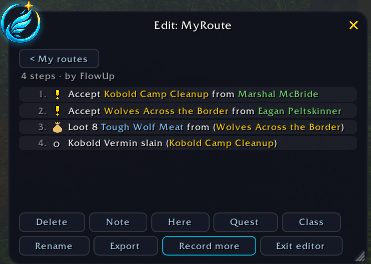
Dungeons are part of the routes along with their quests, and you can remove any you do not want. You can also record your own route while playing, edit it, and share it with another player as text.
Key features
- A route picked from your race and class, or another race's route of your faction if you prefer.
- Steps advance on their own based on quest and level state, no manual ticking needed.
- A dungeon panel listing every dungeon of your faction up to level 60 with its quests and unlocking chains.
- An alt that is already level 6 starts where its level fits, not at step 1.
- Record your own routes, add or remove steps and share them as text.
- Optional automations, all off by default: accepting and turning in quests, flights, repairs and selling gray items.
Installation
- Download the zip and extract it.
- Move the
FlowUpfolder inside it intoWorld of Warcraft\_forever_\Interface\AddOns\. - Close the game completely and reopen it (
/reloadalone does not load new files). - On the character select screen, check that the addon is ticked in the AddOns list.
Commands
/flow route- Opens the route list so you can pick another route.
/flow dungeons- Opens the dungeon panel.
/flow routes- Opens the screen for recording and editing your own routes.
/flow importer- Imports a route text shared by another player.
Notes
- While you play, FlowUp keeps notes on quest givers, objectives and time per level, and asks on first login whether to share them automatically. No character name or realm is sent, and you can turn it off in the options at any time.
- The guide never moves your character and never acts outside a window you opened.
FAQ
How do I skip a dungeon?
Right-click it to remove it from the route, or turn it off under Options, Modules. Its quests go with it, and you can add it back at any time.
Is auto-accepting quests on by default?
No. Everything under Options, Automation starts off. Even when enabled, quests that need a reward choice are not turned in automatically.
Author and license
FlowUp Forever is written by Maks31. License: GPLv3.
Comments and questions
Loading comments…
Checking your session…