
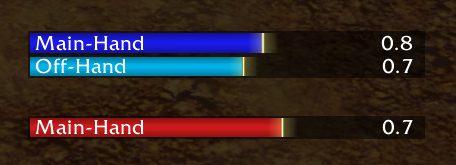

What it does
WeaponSwingTimer tracks main-hand and off-hand melee swings for you and your target. It resets on abilities that reset the swing timer, such as the Warrior's Slam, and accounts for parry haste.
Hunters get Auto Shot timing plus the cast time of Aimed Shot and Multi-Shot, and wand users get the same for Shoot. The shot bar turns white once the projectile leaves you. While it is white you can move and cast without clipping the next shot; when the white part runs out, stand still.
This build continues LeftHandedGlove's original addon and fixes bugs in the hunter timer.
Key features
- Separate bars for your main-hand and off-hand swings and your target's.
- Handles swing-resetting abilities such as Slam, and parry haste.
- Auto Shot and wand Shoot timing, plus Aimed Shot and Multi-Shot cast times.
- The shot bar turns white after the projectile leaves, showing when you can move.
- Frames can be dragged anywhere.
Installation
- Download the zip and extract it.
- Move the
WeaponSwingTimerfolder inside it intoWorld of Warcraft\_forever_\Interface\AddOns\. - Close the game completely and reopen it (
/reloadalone does not load new files). - On the character select screen, check that the addon is ticked in the AddOns list.
Commands
/wst- Opens the configuration window with more visual options.
FAQ
Why does the shot bar turn white?
It turns white when your Auto Shot or Shoot projectile leaves you. Moving while it is white will not clip the next shot; stand still once the white part is used up.
How do I open the settings?
Type /wst in chat. To move a bar, click and drag it.
Author and license
WeaponSwingTimer SixxFix is written by WatchYourSixx. License: GPLv3.