
What it does
X-Perl was abandoned for years. Version 4 rebuilds it as a single addon, and the description says it runs on WoW Forever 1.60.1. The old separate XPerl_* modules are now one folder.
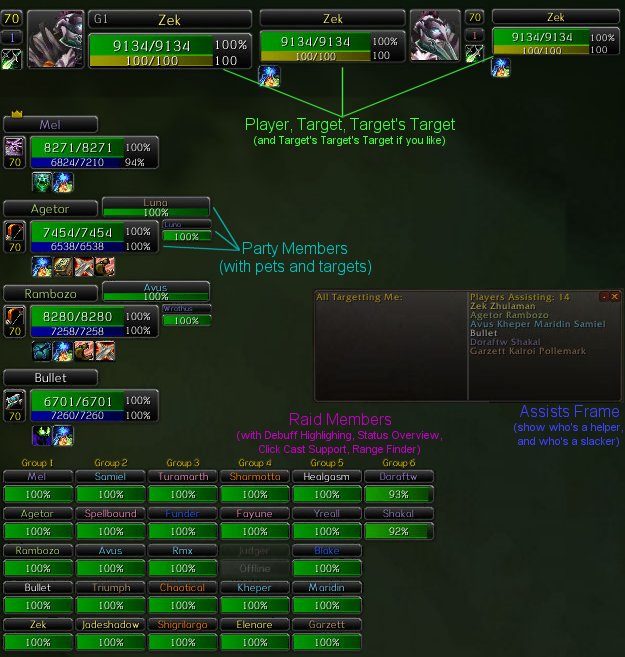
You get frames for player, pet, target, focus, target's target, party, party pets and raids of up to 40. They carry 2D or 3D portraits, cast bars, heal prediction, range fading, and HoT and aggro highlights. Turn off any frame type you do not want and Blizzard's frame stays in its place.
Raid frames can be sorted and filtered by group, class or role. Everything is set from one options window, and your setup can be exported as text.
Key features
- Replacement frames for player, target, focus, party and 40 player raids, target-of-target included.
- 2D or 3D portraits that flash red or green when the unit takes damage or healing.
- Cast bars on every frame plus incoming heal and absorb prediction.
- Range fading using a class spell, a spell you pick, or a fixed 40 yard check.
- A border or timer bar for your own HoTs, with aggro and current target highlights.
- Click casting addons such as Clique work without extra setup.
Installation
- Download the zip and extract it.
- Move the
XPerlfolder inside it intoWorld of Warcraft\_forever_\Interface\AddOns\. - Close the game completely and reopen it (
/reloadalone does not load new files). - On the character select screen, check that the addon is ticked in the AddOns list.
Commands
/xperl- Opens the options window.
/xperl export- Exports settings and frame positions as a plain text string.
/xperl import- Loads an exported settings string.
Notes
- The folder must be named exactly
XPerl. When upgrading from an old X-Perl, delete every old XPerl_* folder from Interface\AddOns first; your settings carry over. - The author says Forever is the main focus but some features are still untested.
FAQ
How do I open the options?
Left-click the minimap button or type /xperl. While the options are open all frames are unlocked, and empty frames show placeholders so you can drag them.
What if I do not want one of the frames?
Switch that frame type off. Blizzard's own frame keeps showing in its place.
Author and license
X-Perl UnitFrames is written by Forge_User_26050436, Seecant. License: GPLv3.