
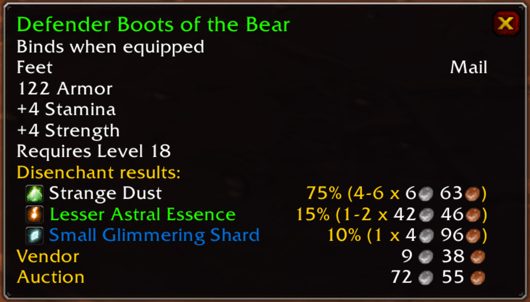
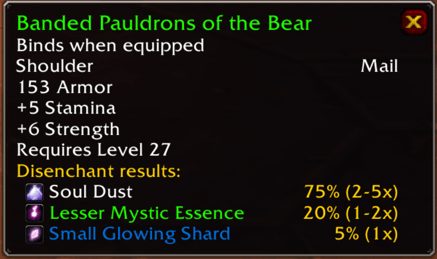
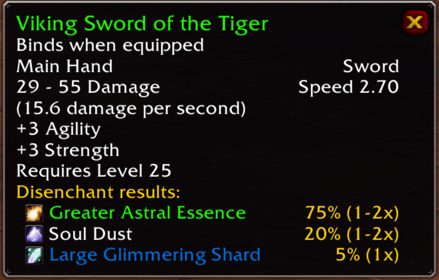
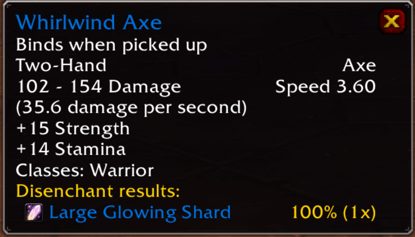
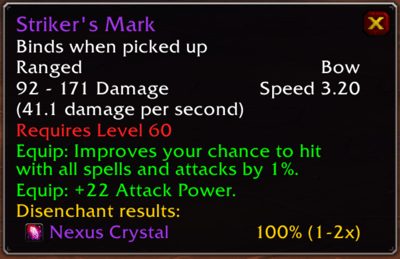
What it does
Once it is installed, hovering over an item shows its disenchant results in the tooltip, so you know what you will get before you break it.
It helps when deciding whether to sell or disenchant, or when gathering materials for Enchanting. There is no separate window; everything happens in the item tooltip.
It is made for Classic Era, Hardcore and Anniversary realms.
Key features
- Disenchant results on item tooltips.
- Works through the tooltip alone, no extra window.
- Lightweight.
- Available in German, French, Spanish, Russian and other languages besides English.
Installation
- Download the zip and extract it.
- Move the
DisenchantBuddyfolder inside it intoWorld of Warcraft\_forever_\Interface\AddOns\. - Close the game completely and reopen it (
/reloadalone does not load new files). - On the character select screen, check that the addon is ticked in the AddOns list.
FAQ
Where do I see the disenchant results?
Hover over an item; the results appear in its tooltip.
Author and license
Disenchant Buddy is written by TheCrux_BB. License: GPLv3.