
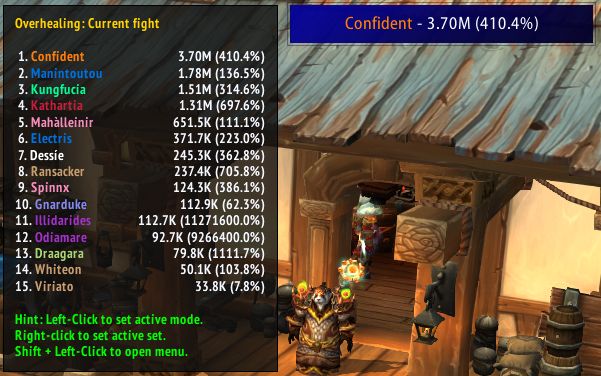
What it does
Skada has several views and splits fights into segments, and you can set up every window on its own. There are three window types: bar (the classic meter), inline (a horizontal strip for custom interfaces) and data text (for LDB displays and minimal setups).
Left-click goes into the detail, right-click goes back, and the mouse wheel scrolls the list. Hovering over a bar shows extra info and shortcuts; Shift-click shows targets, for example.
The built-in Theme Engine exports and imports themes as a string. A default window appears on first load; open the settings from the cog on the window's title bar or from the minimap button and pick Configure.
Key features
- Bar, inline and data text windows.
- Fight segments and several views.
- Built-in Theme Engine: import and export themes as a string.
- Options for alternating row colors, highlight, spark effect and icon scale.
- Works with Data Broker displays such as Titan Panel, ChocolateBar and ElvUI.
- An API so developers can write additional plugins.
Installation
- On the CurseForge page, download the WoW Forever file from the file list and extract the zip.
- Move the folders inside the zip into
World of Warcraft\_forever_\Interface\AddOns\. - Close the game completely and reopen it (
/reloadalone does not load new files). - On the character select screen, check that the addon is ticked in the AddOns list.
Notes
- Open the settings from the cog on the window's title bar or from the minimap button.
- The same author has companion addons such as Skada for Tanks, Skada Graphs and Skada Inline.
FAQ
How do I open Skada's settings?
Click the cog on the window's title bar or the minimap button and pick Configure. New windows are added under the Windows section.
How do I download it?
Click the CurseForge button on this page. In CurseForge's file list pick the WoW Forever file, download it and follow the installation steps.
Author and license
Skada Damage Meter is written by Zarnivoop. License: MIT.